Chatbot vs AI Virtual Assistant Research + Ideation
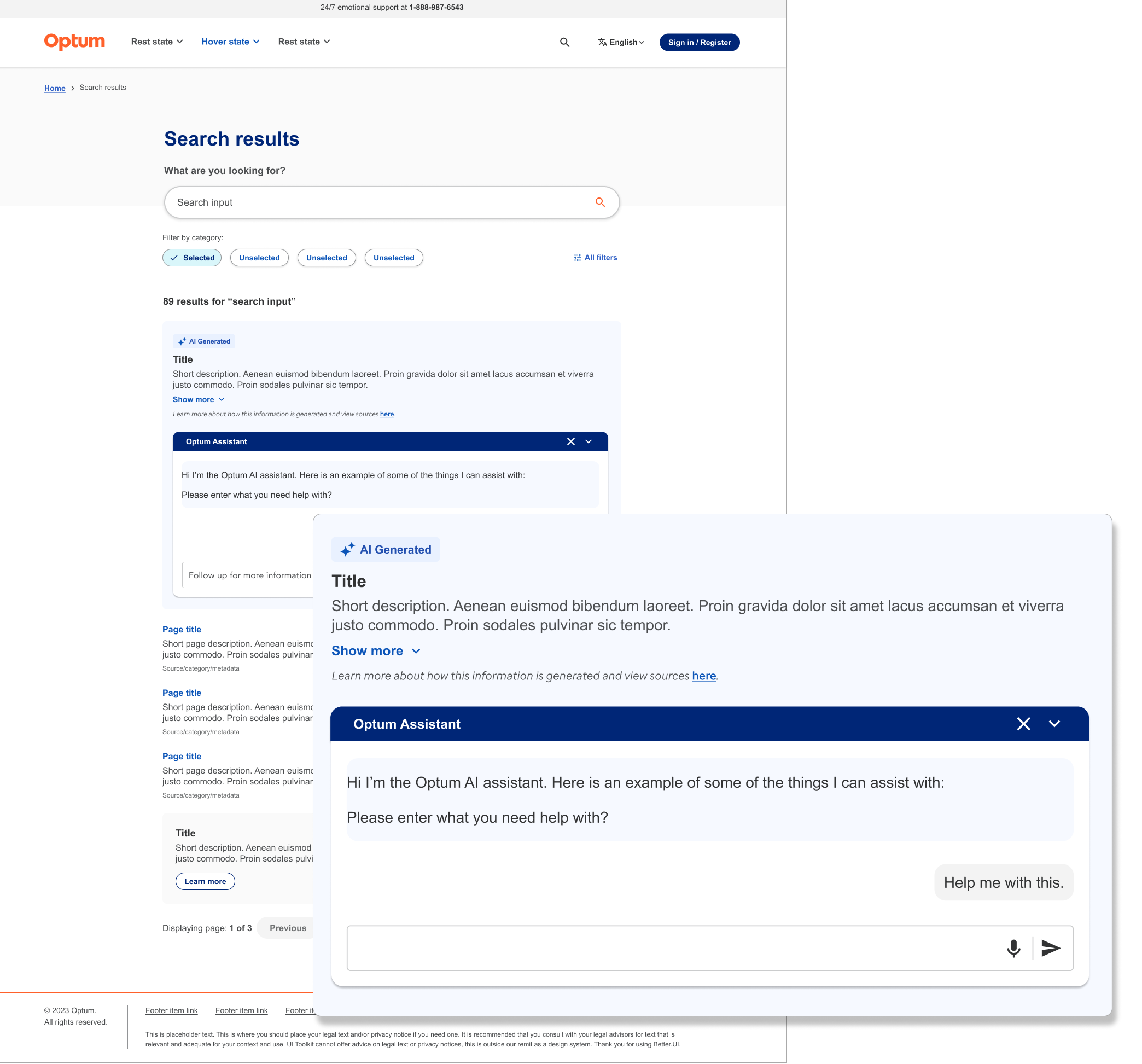
Project information
- Collaborators: UX Director, Business team
- Client: Optum's Chatbot Team
- Tools: Figma, Claude
- Methods Used: Claude assisted research, user flow mapping, wireframing, high-fidelity mockups
- Role: Working independently with management oversight to explore ai-powered chatbot vs virtual assistant feature implementation
Exploring chatbot vs virtual assistant on-page feature for cross-product implementation
Project overview
I worked independently with management oversight, on the research and exploration of what an on-page virtual assistant would look like and how it would operate along side the current functionalities. I inherited the project from management who updated me with requirements from engineering and product.
- Current search functionality is insufficient, leading to increased customer service volume as users aren't satisfied the information they are finding.
- Users are abandoning self-service options and defaulting to phone support.
- Business wants to implement a conversational AI assistant that extends search capabilities by engaging users in follow-up dialogue.
Problems to solve
- Decide if an on-page virtual assistant or a traditional chatbot would be the best user experience.
- User would get personalized guidance by receiving information specific to their needs.
- Reduce support costs by deflect customer service inquiries by helping users complete tasks independently.
- User avoids dead ends by getting alternative options when initial search results don't lead to actionable solutions
What I was looking for during research
I needed to know the differences between a chatbot and virtual assistant and compare the results to the project requirements to decide what feature would be the best solution. I prompted Claude to generate a table of the differences between the two.
Side-by-Side Differences of Chatbot and Virtual Assistant
| Feature | Chatbot | Virtual Assistant |
|---|---|---|
| Primary Purpose | Handle specific, narrow conversations (e.g., FAQs, support) | Manage a wide range of tasks and act as a personal aide |
| Intelligence | Mostly rule-based or scripted decision trees | AI-powered with NLP, ML, and contextual reasoning |
| Task Scope | Single-domain (e.g., customer service, booking) | Multi-domain — calendars, reminders, search, smart home, and more |
| Input Type | Primarily text-based | Voice and text, often both simultaneously |
| Personalization | Little to none; same responses for all users | Learns preferences, habits, and adapts over time |
| Context Memory | Limited to the current session or conversation | Retains long-term context and user history |
| Proactiveness | Reactive — responds only when prompted | Proactive — can send reminders, alerts, and suggestions unprompted |
| Integrations | Typically lives on one platform (website, app, Slack) | Connects across many services (calendar, email, IoT, apps) |
| Complexity | Simpler to build and deploy | More complex, requires robust AI infrastructure |
| Best Used For | Customer support, lead gen, surveys, simple Q&A | Productivity, scheduling, home automation, personal help |
Feature Requirements
- Chat should be able to offer additional information outside of the initial search
- Must be able to retain conversation context and user history
- Close feature that would allow the chat to be closed, but offer the option to retain or end the conversation.
- Must be able to handle large volumes of users.
- Must be scalable to allow for future growth in capabilties.
- Needs to meet engineering standards and security requirements.
Solution from Research
Based on the project requirements, a virtual assistant would be the best solution. It would be able to retain long-term context and user history, be scalable to add new features like voice initiation and meet engineering standards and security requirements.

Ideation for virtual assistant open and close states
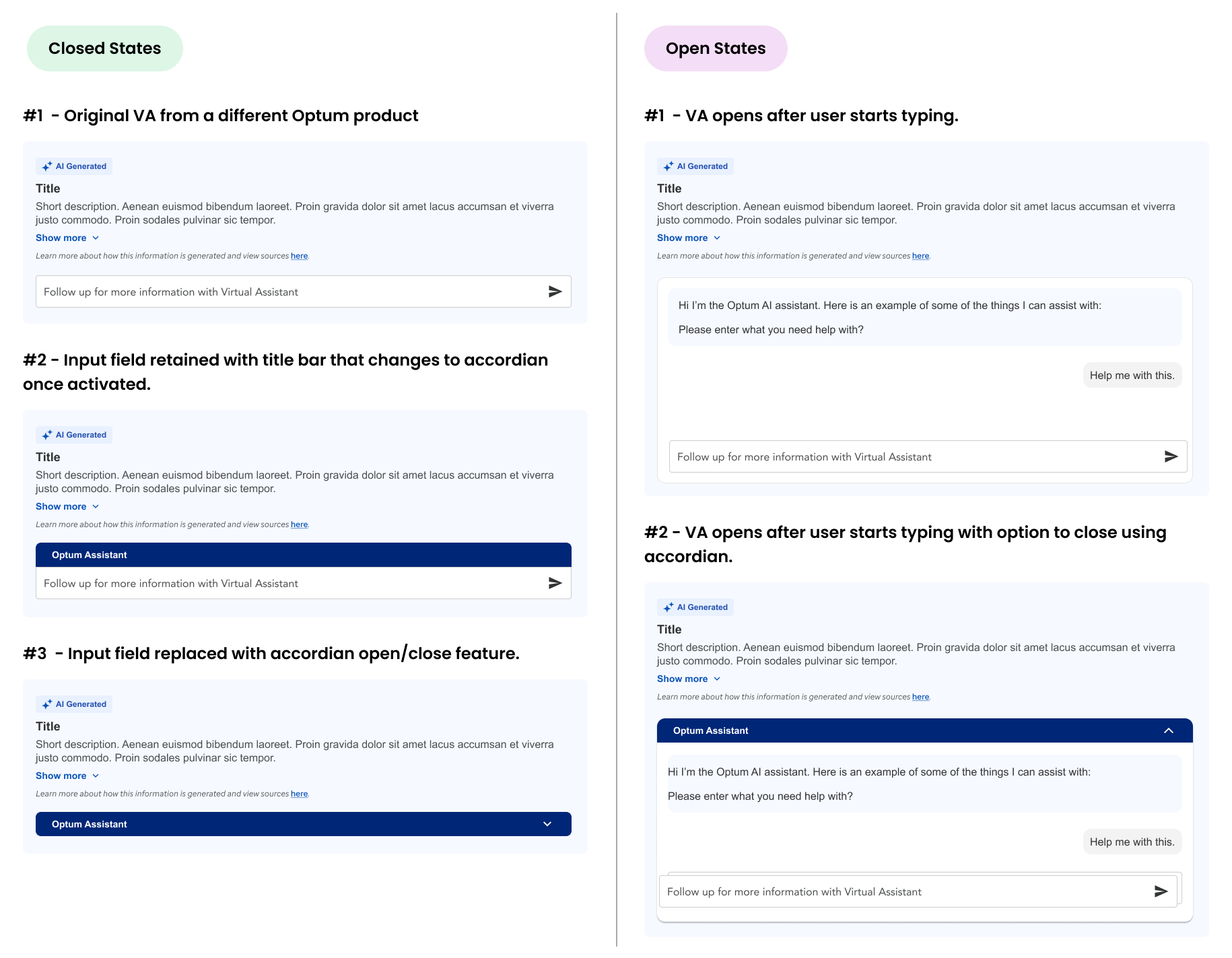
The first challenge was using a virtual assistant from another product as a starting point and explore unactivated and activated states of the feature and how they would work within the body of the search page and what was the most user-friendly solution.
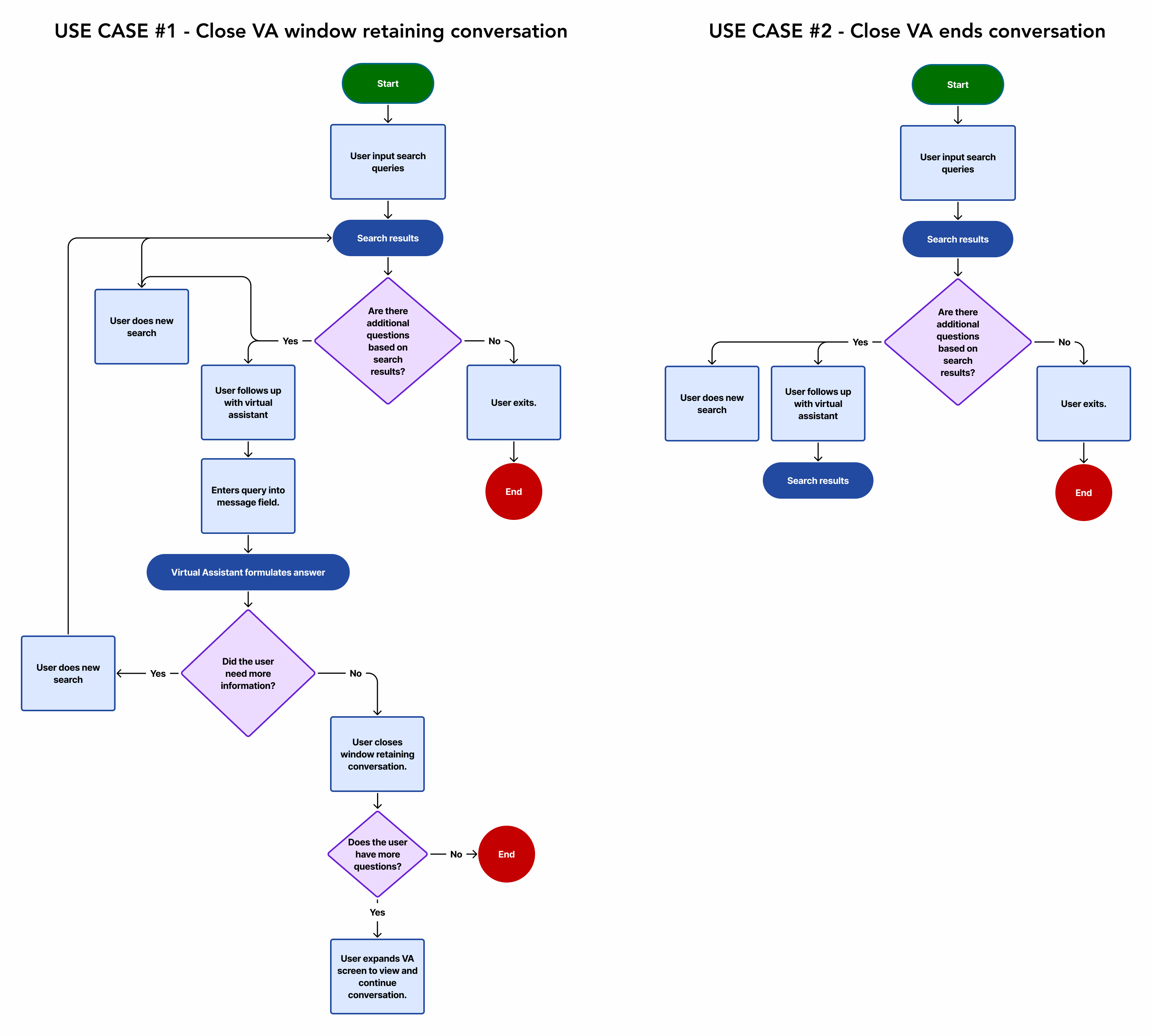
Use cases flow chart for ending conversation
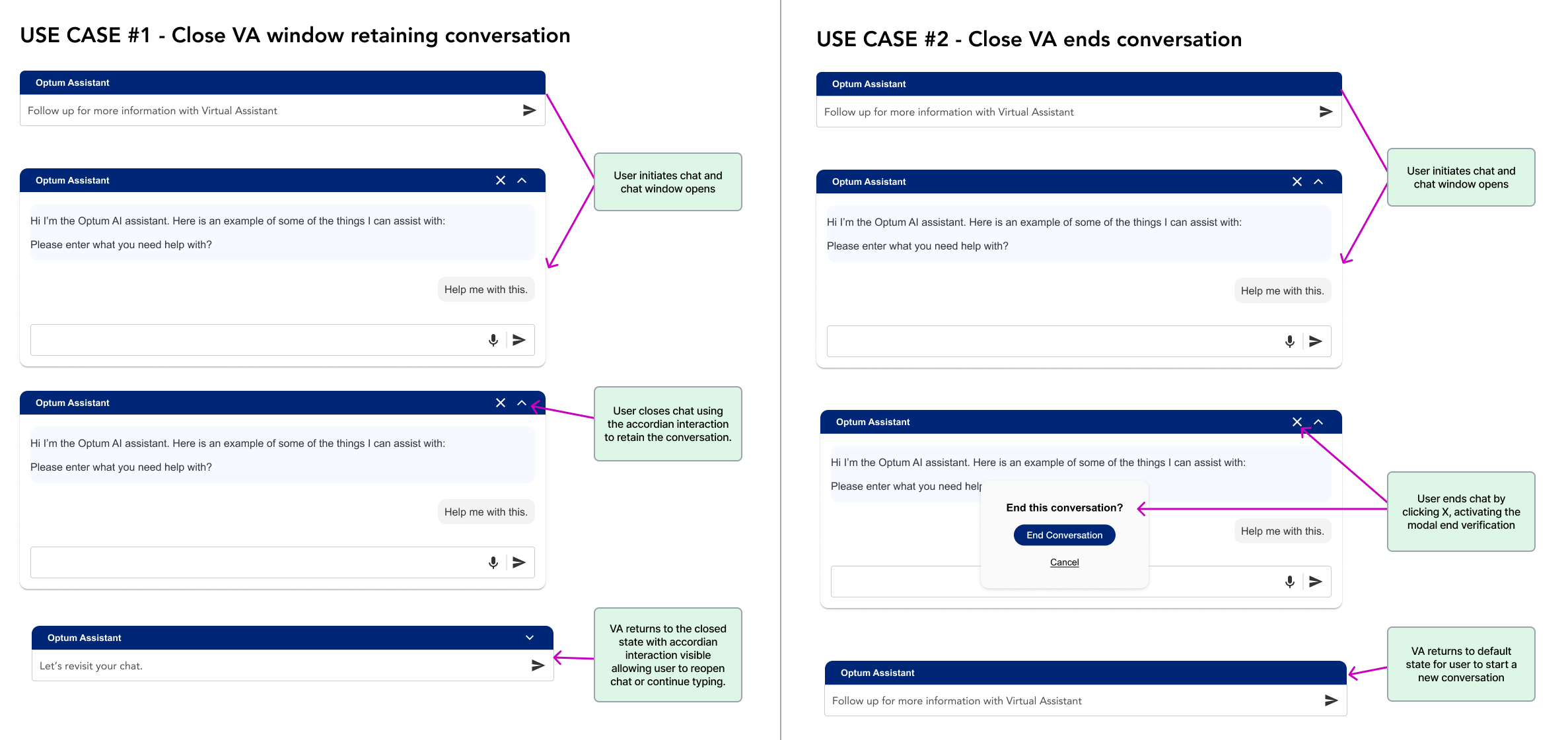
There are two use cases that I mapped out in a flow chart.
- User can close conversation and retain contents.
- User can end conversation and delete contents.
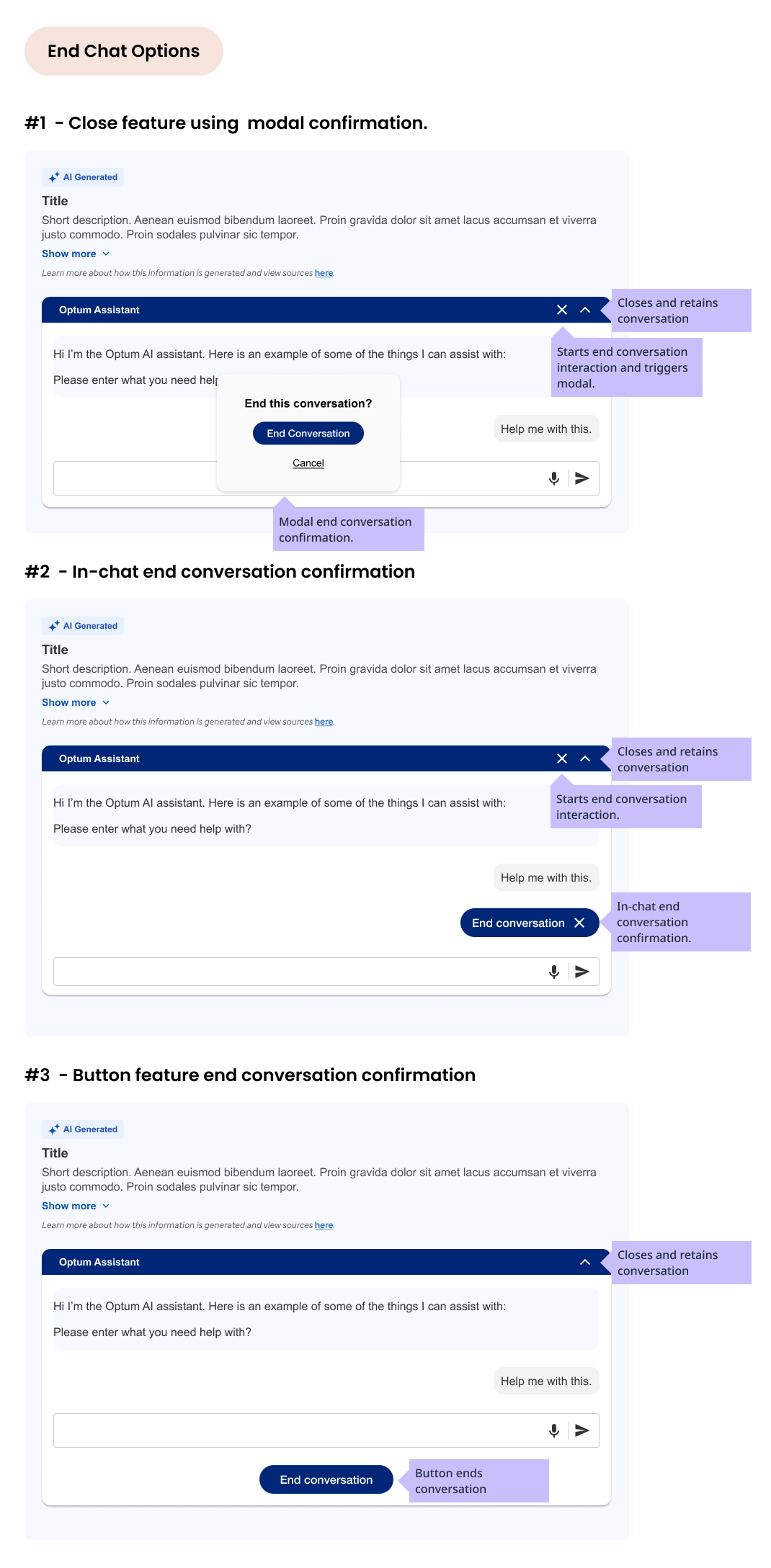
Ideation for virtual assistant end or retain conversation states.
I worked through several iterations of the end chat feature and what would be the most user friendly solution. Each option allows user to close conversation and retain contents or end conversation and delete contents. User can reopen window and continue, if they choose to retain the entries.
Ending conversation options considered
- Confirms end of conversation with modal confirmation feature.
- In-chat feature that appears when user clicks X to initiate end of chat.
- End conversation button that is always present. User can end at any time.
Use cases displayed in high-fidelity mockups
I worked through several iterations of the end chat feature and what would be the most user friendly solution. Each option allows user to close conversation and retain contents or end conversation and delete contents. User can reopen window and continue, if they choose to retain the entries.
Ending conversation options considered
- Confirms end of conversation with modal confirmation feature.
- In-chat feature that appears when user clicks X to initiate end of chat.
- End conversation button that is always present. User can end at any time.
Conclusion and Takeaways
The project was not incomplete. Information was lacking including requirements and engineering participation. Apart from that, I feel the iterations were a good start and managed the project with few resources. If the project would have continued, I would have liked to present my ideas to engineering and product to get their feedback and input. I would also have liked to have testing with users to see if the feature was user-friendly and if it was meeting the needs of the users.